SMS Hospital Report: if you recently had a blood test, urine test, pathology test, or other laboratory investigation at SMS Hospital Jaipur, you may be able to check the result online without returning to the hospital only to collect a paper report.
The SMS Hospital lab report online service is available through Rajasthan’s official Integrated Health Management System (IHMS) for eligible Central Laboratory reports. Depending on the search option available on the portal, patients may be asked for details such as their CR Number, Bill Number, registered mobile number, or other patient information.
This can be especially useful for follow-up patients who need to share recent test results with a doctor or keep a digital copy for future visits.
In this guide, we explain how to check SMS Hospital Jaipur lab reports online in 2026, where to find the required CR or Bill Number, how to view and download the report PDF, what to do if the report is not showing, and how to keep your medical information secure while using the IHMS portal.
On this pageJump to a section of this guide
SMS Hospital Lab Report Online 2026: Quick Overview
Patients who have completed a laboratory test at SMS Hospital Jaipur can use the IHMS Rajasthan system to check eligible reports online without returning to the hospital only for report collection.
| SMS Hospital Lab Report Detail | Information |
|---|---|
| Hospital | Sawai Man Singh (SMS) Hospital, Jaipur |
| Online Service | Central Laboratory Investigation Report |
| State | Rajasthan |
| Access Mode | Online |
| Report Format | View / PDF download where available |
| Service Cost | Free through the official portal |
| Official Portal | IHMS Rajasthan |
| Devices Supported | Mobile, tablet, laptop, desktop |
| Common Details Needed | CR Number, Bill Number, registered mobile number, or other details shown on the portal |
The online facility is useful for patients who need to check, save, print, or share an SMS Hospital lab report for follow-up treatment.
Official Website to Check SMS Hospital Lab Report
For SMS Hospital Jaipur lab report download, use the official Rajasthan Government IHMS portal:
Open the Official IHMS Rajasthan Portal
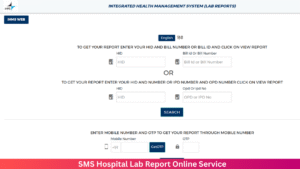
After opening the portal, look for the Central Laboratory / Download Investigation Report option or the laboratory-report service currently displayed.
Before entering any patient information, check that the website is on the official Rajasthan Government domain.
Do not enter sensitive details such as:
- CR Number
- Bill Number
- Registered mobile number
- OTP
- Patient identification details
- Medical information
on unknown websites or unofficial pages claiming to provide SMS Hospital reports.
For broader information about the hospital and attached institutions, patients can also visit:
SMS Medical College & Attached Hospitals
What You Need to Check an SMS Hospital Lab Report Online
Before opening the report page, keep the hospital slip, laboratory receipt, or bill from your visit nearby.
Depending on the search method currently offered by IHMS, you may need details such as:
- CR Number
- Bill Number
- Registered mobile number
- Other patient details requested by the portal
The most important step is to enter the information exactly as it appears on the hospital record.
If the portal changes its search fields or layout, follow the options currently shown on the official IHMS website rather than relying on an old screenshot or outdated guide.
What Is a CR Number in SMS Hospital?
The CR Number (Case Record Number) is used to identify a patient’s hospital record in the SMS Hospital system.
You can usually find it on documents such as:
- OPD registration slip
- Hospital prescription
- Patient registration receipt
- Previous SMS Hospital records
When checking an SMS Hospital lab report online, enter the CR Number exactly as printed. Even one incorrect or missing digit can prevent the portal from locating the correct patient record.
What Is a Bill Number?
The Bill Number is linked to the relevant laboratory investigation or billing record.
If the IHMS report page asks for a Bill Number, use the number connected with the specific test or laboratory visit you want to check.
Hospital paperwork may contain several reference numbers, so do not guess. Match the number with the laboratory bill or investigation record before submitting it.
How to Check SMS Hospital Lab Report Online in 2026
Once you have your hospital slip or laboratory bill ready, the report-checking process is straightforward.
Step 1: Open the official IHMS Rajasthan portal.
Go to IHMS Rajasthan using your phone, tablet, or computer.
Step 2: Open the laboratory report section.
Look for Central Laboratory – Download Investigation Report or the equivalent laboratory-report option shown on the portal.
Step 3: Select the search method.
The portal may ask for a CR Number, Bill Number, registered mobile number, or another supported patient detail.
Step 4: Enter the details exactly.
Use the numbers printed on your SMS Hospital documents. Avoid extra spaces, typing errors, or using a different hospital reference number.
Step 5: Complete verification if required.
If mobile verification or OTP is requested, complete it only on the official IHMS Rajasthan website.
Step 6: Open the available lab report.
Once the record appears, check that it belongs to the correct patient and investigation.
Step 7: Download or print the report.
Use the Download, PDF, or Print option where available and save a copy for future consultation.
A simple flow is:
Hospital Slip → CR/Bill Number → IHMS Report Search → Verify Patient/Test → Download PDF
What to Check Before Downloading the SMS Hospital Report
Before saving the PDF, make sure the report actually matches the investigation you are looking for.
Check the available details such as:
| Detail to Check | Why It Matters |
|---|---|
| Patient Name / Details | Confirms the report belongs to the correct patient |
| Investigation / Test Name | Confirms you opened the intended laboratory test |
| Visit or Investigation Details | Useful when several tests were done |
| Report Date | Helps distinguish old and recent reports |
| Hospital / Laboratory Information | Confirms the report is linked to the expected SMS Hospital record |
This is particularly important for patients who have had multiple laboratory tests or repeated hospital visits.
If the displayed details do not match your records, do not rely on the report. Recheck the CR Number or Bill Number and, if needed, contact the appropriate SMS Hospital service for clarification.
How to Download SMS Hospital Lab Report PDF on Mobile
You can check and save an SMS Hospital lab report directly on your phone; a computer is not required.
Once the report opens on the IHMS Rajasthan portal:
Step 1: Open the report fully.
Make sure the patient name, test details, and report date are correct before saving anything.
Step 2: Use Download or Print.
If the report page shows a Download, PDF, or Print option, use it to save a copy.
Step 3: Use the browser menu if no download button appears.
Most modern browsers allow you to use Print → Save as PDF even when the report page itself does not show a separate download control.
Step 4: Find the saved file.
On Android, check:
Files → Downloads
On iPhone, check:
Files → Downloads
or the browser’s configured download location.
Step 5: Rename the file clearly.
A simple filename such as:
SMS-Hospital-Lab-Report-Oct-2026.pdf
makes the report much easier to locate before a follow-up consultation.
SMS Hospital Lab Report Not Showing? Check These First
If your SMS Hospital lab report is not showing online, do not immediately assume the IHMS portal has failed.
The most common causes are:
| Problem | What It Usually Means |
|---|---|
| Wrong CR Number | Patient record cannot be matched |
| Wrong Bill Number | A different reference number may have been entered |
| Report still processing | Laboratory work is not yet complete |
| Report not uploaded | Test may be complete but not available online yet |
| Wrong visit/test details | Search details do not match the investigation |
| Report not supported online | Some investigations may follow a different reporting process |
| Portal temporarily unavailable | Server, maintenance, or connectivity issue |
The first thing to do is compare the entered details with the original SMS Hospital slip or laboratory bill.
If the Portal Shows “No Record Found”
Check:
- CR Number digit by digit
- Bill Number from the correct laboratory investigation
- Correct hospital visit
- Correct patient record
- Whether you accidentally entered another receipt or reference number
If all details are correct, the report may simply not be available online yet.
Avoid repeatedly trying random numbers, because that will not help identify the correct record.
IHMS Rajasthan Portal Not Opening
If the SMS Hospital report page is not loading, try a few simple fixes before assuming the service is unavailable.
Reload the page once.
A temporary network error may clear immediately.
Open the main IHMS portal again.
If a saved direct link no longer works, start from the official portal homepage and reopen the laboratory-report service.
Try another browser.
Chrome, Safari, Edge, or another updated browser may load the report page more reliably.
Change the internet connection.
Switch between Wi-Fi and mobile data if the connection is unstable.
Try again later.
Temporary server load or maintenance can affect government portals.
Most importantly, do not move to an unknown third-party site simply because the official portal is temporarily unavailable.
SMS Hospital Report OTP Not Received
If the IHMS system asks for OTP verification and the code does not arrive, check these points first:
Use the registered mobile number.
The number must match the patient record linked with the hospital registration.
Check network signal.
Weak mobile coverage can delay SMS delivery.
Wait before requesting another OTP.
Repeated requests can result in multiple delayed codes arriving together.
Check blocked or filtered messages.
Spam filters or SMS-management apps can sometimes hide automated messages.
Never share the OTP with a third-party website, WhatsApp contact, agent, or anyone claiming they need it to retrieve your report.
Only One Test Report Is Showing
If several tests were performed during the same SMS Hospital visit, they may not all become available at the same time.
For example, one routine blood result may appear earlier while another specialised investigation is still processing.
When checking the portal:
- Compare the test name
- Check the report date
- Confirm the correct investigation
- Recheck later if another result is still pending
A missing result does not automatically mean the test was cancelled.
If the report remains unavailable beyond the timeframe given by the hospital, contact the relevant laboratory or department for clarification.
Who Can Use the SMS Hospital Online Lab Report Service?
The SMS Hospital online report facility is mainly useful for patients whose investigations are processed through the hospital’s Central Laboratory system and made available through IHMS Rajasthan.
This can include:
- OPD patients
- IPD patients
- Blood-test patients
- Urine-test patients
- Pathology investigations
- Other laboratory tests uploaded to the IHMS system
However, not every report from every department is guaranteed to appear through the same online service. Some investigations may follow a different reporting process or may not be uploaded online.
So if your report is missing, first confirm whether that particular test is available through the Central Laboratory report facility before assuming there is a technical problem.
Is SMS Hospital Lab Report Download Free?
Yes. Eligible SMS Hospital Central Laboratory reports can be accessed through the official IHMS Rajasthan service without a separate report-download charge.
You should therefore be cautious if an unofficial website asks you to pay simply to retrieve an SMS Hospital lab report using your CR Number, Bill Number, or other patient details.
Use the official government portal whenever possible.
Is It Safe to Check SMS Hospital Reports Online?
Yes, provided you use the official Rajasthan Government IHMS portal and handle your medical information carefully.
Your lab report may contain sensitive health information, so treat the downloaded PDF with the same care as a physical hospital record.
Follow these basic precautions:
- Use only the official government portal
- Never share OTPs with unknown people
- Avoid entering patient details on unofficial websites
- Do not upload the report publicly
- Avoid downloading reports on shared computers
- Delete downloaded copies from shared devices after use
- Keep the PDF in a private folder
- Share the report only with people involved in the patient’s care
If a third-party website, WhatsApp contact, or agent asks for your OTP or hospital credentials, do not proceed.
Online Lab Report Is Not the Same as Medical Advice
The IHMS Rajasthan report service helps you access your test result; it does not explain what the result means medically.
A laboratory report may contain:
- Reference ranges
- Test values
- Flagged results
- Medical abbreviations
- Technical terminology
- Results that need to be interpreted alongside symptoms and treatment
A value marked high or low does not always mean the same thing for every patient.
If your doctor asked you to return after the investigation, keep that follow-up appointment even if you have downloaded the report successfully.
Do not stop, start, or change medicines based only on a laboratory value without discussing it with an appropriate medical professional.
Official SMS Hospital Report and Patient Resources
Use official government websites for report access and hospital information.
| Service | Official Resource |
|---|---|
| IHMS Rajasthan Online Services | Open IHMS Rajasthan |
| SMS Medical College & Attached Hospitals | Official SMS Jaipur Website |
| Government of Rajasthan | Rajasthan Government |
For SMS Hospital lab report download, the IHMS Rajasthan portal is the main resource to check first.
SMS Hospital Lab Report Online FAQs
How can I check my SMS Hospital lab report online?
Open the official IHMS Rajasthan portal, go to the Central Laboratory investigation-report service, enter the patient details requested by the system, complete any verification, and open the available report.
What details are required to check the report?
Depending on the search option available, the portal may ask for:
- CR Number
- Bill Number
- Registered mobile number
- Other patient details supported by the system
Keep your SMS Hospital registration slip and laboratory paperwork nearby while checking.
Where can I find my CR Number?
The CR Number may be printed on the:
- OPD registration slip
- Hospital prescription
- Registration receipt
- Previous SMS Hospital records
Enter it exactly as printed.
Can I download the SMS Hospital lab report on mobile?
Yes. The IHMS portal can be opened on a mobile browser, and the report can be saved when a Download, PDF, or Print option is available.
Why is my SMS Hospital report not showing?
Common reasons include:
- Report still under processing
- Report not uploaded yet
- Wrong CR Number
- Wrong Bill Number
- Incorrect patient details
- Investigation not supported through the online facility
- Temporary portal issue
How long does an SMS Hospital lab report take to appear online?
There is no single fixed timeframe for every test.
Routine investigations may become available sooner, while some specialised tests can take longer because they require additional processing or review.
Is SMS Hospital lab report download free?
Yes. Eligible Central Laboratory reports can be accessed through the official service without a separate download charge.
Can a family member download the report?
Yes, a family member may assist the patient if they legitimately have access to the required hospital details and can complete any verification requested by the official system.
Patient information and OTPs should still be kept private.
Is there an SMS Hospital lab report app?
For report access, use the official IHMS Rajasthan web service unless the Rajasthan Government itself directs patients to a specific official app.
Avoid unverified third-party apps claiming to provide hospital reports.
What should I do if the report looks incorrect?
Do not rely on a report if the patient name, investigation, or other details do not match.
Recheck the entered CR Number or Bill Number and contact the relevant SMS Hospital department if clarification is needed.
Before Closing the SMS Hospital Report Page
Once your report opens successfully, do not close the page immediately.
Check these five things first:
1. Confirm the patient details.
Make sure the report belongs to the correct patient.
2. Confirm the investigation.
Check that this is the test you were waiting for.
3. Save the report.
Download the PDF or use the available print/save option.
4. Store it safely.
Rename the file clearly and keep it somewhere easy to find before the next consultation.
5. Follow the doctor’s advice.
Downloading the report does not replace a follow-up visit when one has been advised.
SMS Hospital Lab Report Online: Final Guidance
The SMS Hospital Lab Report Online service can save eligible patients an unnecessary return trip simply to collect a laboratory result.
The best approach is straightforward:
Keep your hospital slip ready → open the official IHMS Rajasthan portal → search using the correct patient details → verify the report → save the PDF securely.
If the report is not available, first check the CR Number, Bill Number, test status, and whether that investigation is supported online before assuming something has gone wrong.
Most importantly, use only official government services, protect your OTP and medical information, and treat the online report as a medical record—not as a replacement for professional interpretation.
Read More: SMS Hospital Report Online Download 2026: Check Lab Report by HID, Bill ID, OPD/IPD Number or OTP